Features
Beta features
The phases timeline and other experiments
Off by default, under Preferences > Add-ons > OGC 3D Tiles > Beta features:
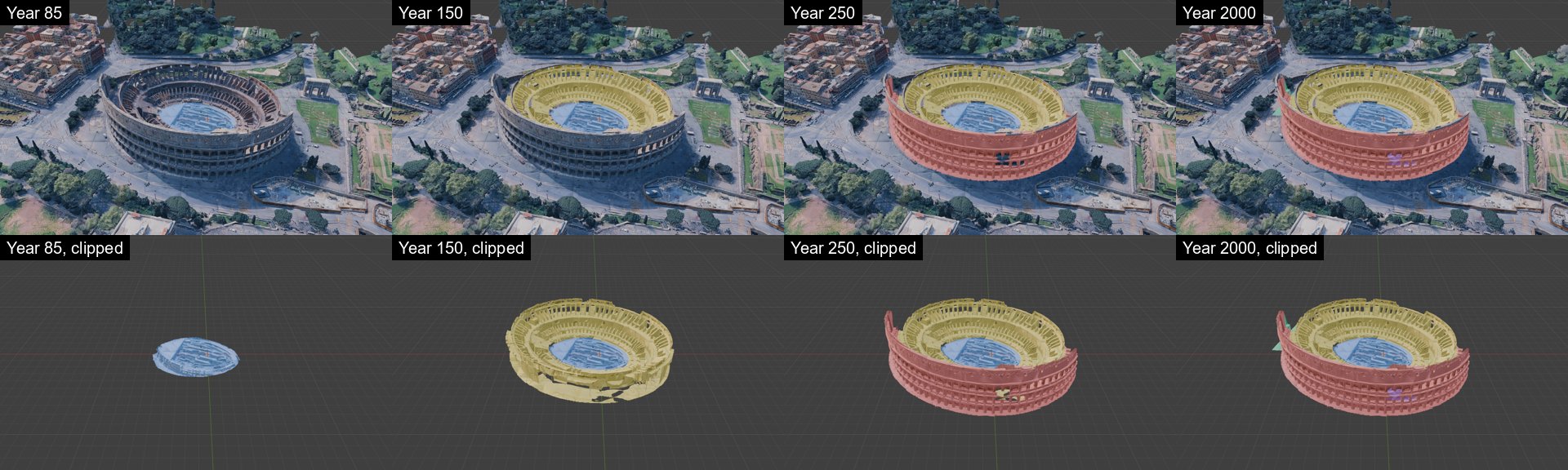
- Phases timeline. A sidebar tab of its own, Phases, for closed meshes in a
Phasescollection, each with the custom propertiescode(1 to 255) andyear, optionallycolor. Build class grid voxelizes them around the scene origin into a one-tile voxel tileset, later years winning where they overlap, and adds it to the list. After a Start, every other tileset is colored by it, and the year slider shows the phases built by then. Clip to phases hides the surface outside them too.scripts/phase_volumes.pybuilds a demo on invented volumes. The grid is one tile, with no coarser levels. See docs/voxels.md for classes per cell and how the tileset is made. - Phases from strokes. Needs Phases timeline. Draw on the monument with Annotate
(stroke placement Surface) or a Grease Pencil object, then Phase from strokes in the
Phases panel asks for a code, a year, a color and how to read the strokes.
Painted areas (default): everything within the Brush radius of a stroke is in the
phase, in depth too, so scribbling over an area fills it and it follows curved surfaces.
The strokes are kept as a wire mesh with a
brushproperty in thePhasescollection. Outlines: each stroke is the outline of a flat area and becomes a prism, from In front metres toward the viewer to Behind metres away; an outline that wraps around a corner needs a stroke per face. Build class grid then treats both like any other volume. Checked with generated strokes, not yet with hand-drawn ones. - Material controls. The sliders of the shared shader nodes, in the Nodes: Material panel. See Nodes: Material Shader.