The sidebar
Every panel of the 3D Tiles tab, top to bottom
Each section is a panel of its own: boxed, collapsible, and re-orderable with the drag handle in its header. Blender remembers the order and which ones are folded.
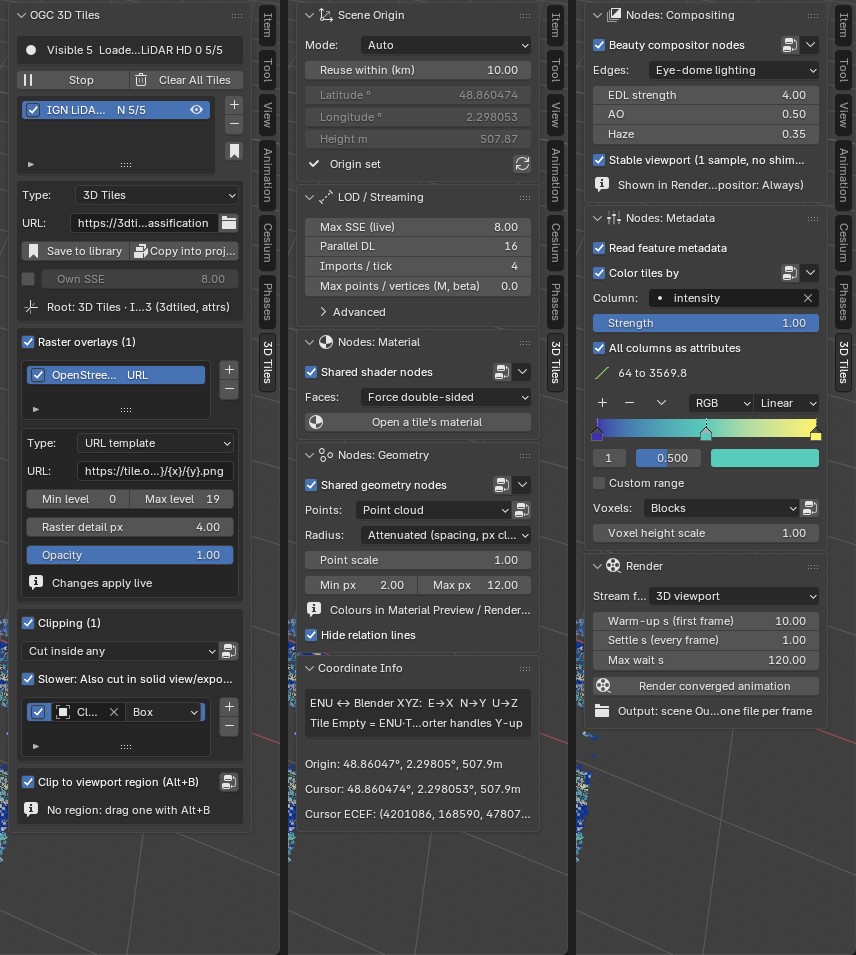
| Panel | What is in it |
|---|---|
| OGC 3D Tiles | Status line, Start / Stop / Clear, the tileset list and the selected tileset's fields. Below: its Raster overlays and its Clipping, each in a box with the checkbox that switches it on, and Clip to viewport region (Alt+B), which applies to all tilesets. |
| Scene Origin | Where the Blender origin sits on the globe. |
| LOD / Streaming | Max SSE, parallel downloads, imports per tick, the points / vertices cap, and an Advanced sub-panel. |
| Nodes: Material | Shared shader nodes, back-face handling, a button that opens a tile's own material. |
| Nodes: Geometry | Shared geometry nodes, point display and radius, relation lines. |
| Nodes: Compositing | Beauty compositor nodes with their sliders. |
| Nodes: Metadata | Read feature metadata, colour tiles by a column, voxel display. |
| Render | Stream for the viewport or the scene camera, converged animation. |
| Coordinate Info | Origin and cursor coordinates. |
The backend (cesium-native or pure Python) is chosen in the add-on preferences.
LOD / Streaming
Defaults: Max SSE 8 px, 16 parallel downloads, 4 imports per tick.
Max points / vertices (M, beta) caps what is shown, all tilesets together. Over the cap every tileset is streamed coarser (its SSE is multiplied, and the panel shows by how much) until the view fits; detail returns when there is room. 0, the default, means no cap. The coarsest tiles of a tileset are always shown, so a cap below their size cannot be met.
Advanced holds the build time while navigating, the disk cache, per-stream backend statistics, and:
- with cesium-native, its cache size in MB. This is memory for tiles that are loaded but no longer shown; it is not a cap on what is shown.
- with the pure Python backend, Max Tiles, foveation, detail falloff and max distance.
The four node rows
Shared shader nodes, Shared geometry nodes, Beauty compositor nodes and Color tiles by work the same way:
- the checkbox creates the node group when missing and puts it on every tile, loaded or streamed later. Unticking takes it off and keeps the group in the file, so hand edits survive;
- the node button opens the group pinned in a node editor (an existing one, or the 3D viewport split in two);
- the arrow menu resets the group to the add-on's default nodes, or deletes it.
The other node groups have the same node button next to their setting: the point display, splat tiles, the voxel display, a tileset's clipping volumes and the viewport-region clip.